The Problem
Working across multiple Claude Code projects means sessions pile up fast. When you need to get back to something (yesterday’s debugging session, a task Claude flagged for follow-up, or a session you want to bookmark), finding it and resuming in the right context adds friction.
claude --resume shows a list, but the summaries are compressed and hard to read. You end up scrolling through UUIDs instead of working.
What cc-deck Does
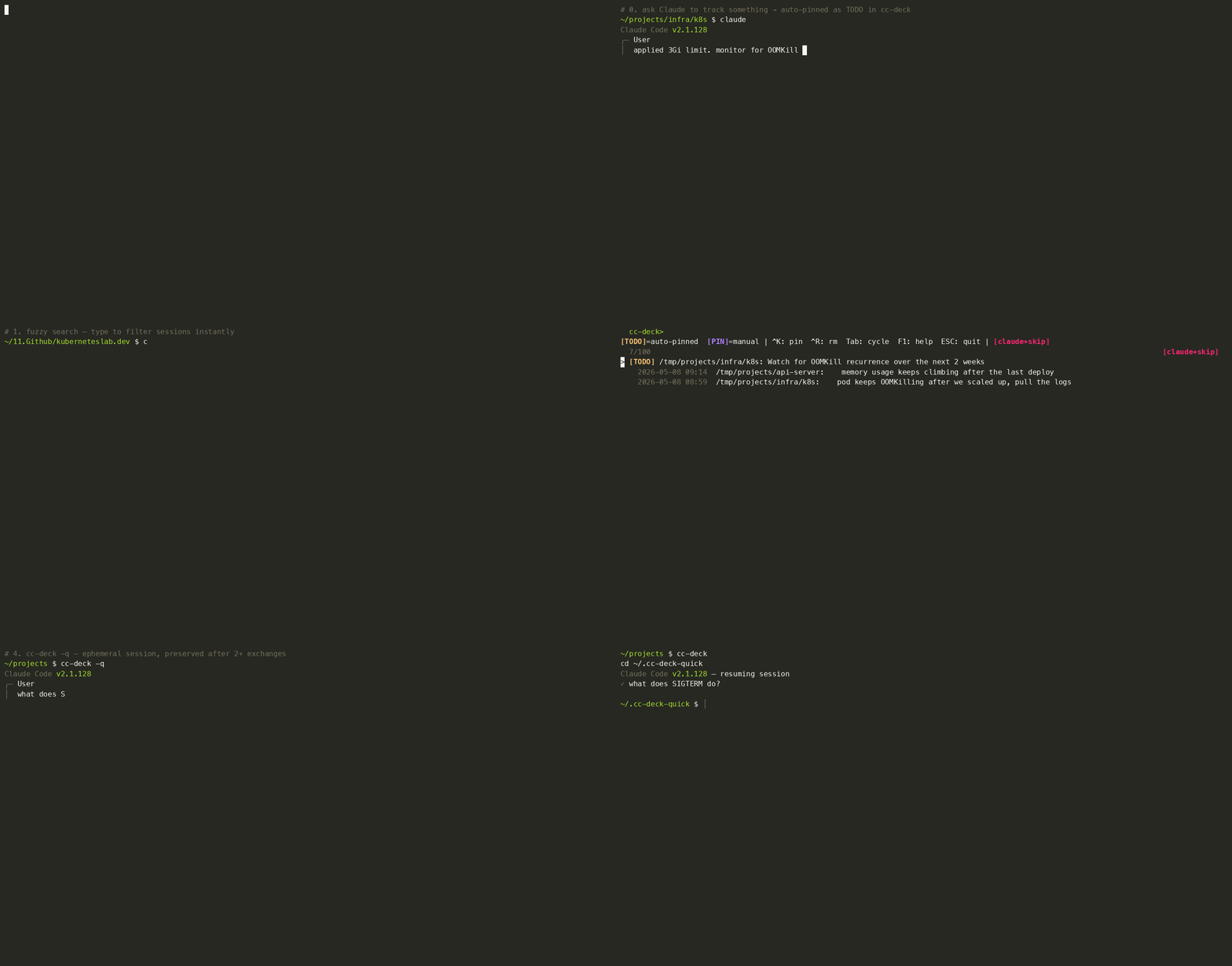
cc-deck opens an fzf TUI for all your Claude Code sessions. Each entry shows the last thing you typed, not a summary. Type anything to filter in real time. TODOs from Claude memory and manually pinned sessions are always at the top.
Supports macOS (zsh), Linux (bash), and Windows (PowerShell).
Features
1. Fuzzy Search
Type anything in the prompt to filter sessions by last input content in real time. No need to remember when or where a session happened.
cc-deck> OOM
  2/100
  2026-05-08 08:59  /tmp/projects/infra/k8s: pod keeps OOMKilling after we scaled up
Select one and cc-deck moves to the original directory, resuming the session automatically.
2. Auto-pinned TODOs
When you ask Claude to track something for later:
add this to memory as a TODO
check back on this next week
Claude writes a memory entry:
---
name: TODO - Monitor EKS cluster after 3Gi memory limit applied
description: Watch for OOMKill recurrence over the next 2 weeks
type: project
originSessionId: a40fabf4-3d29-4014-a710-dcd444580c9d
---
cc-deck scans ~/.claude/projects/*/memory/*.md for type: project entries with TODO in the name, and pins them at the top, linked back to the originating session via originSessionId. Select one and you’re taken straight back to where the work happened.
[TODO] /tmp/projects/infra/k8s: Watch for OOMKill recurrence over the next 2 weeks
When the TODO is resolved, press Ctrl-R. cc-deck renames the memory entry from TODO - Monitor EKS ... to Monitor EKS ... (completed) and removes it from the list. The memory file itself is preserved, so Claude still has the full context.
3. Manual PIN
Bookmark any session you want to return to. Find the session and press Ctrl-K. The session’s last input is saved as the label and it stays pinned at the top.
[PIN] /tmp/projects/api-server: memory usage keeps climbing after the last deploy
Select it and cc-deck takes you back to /tmp/projects/api-server and resumes exactly where you left off. Press Ctrl-K again on a pinned entry to remove it. Ctrl-R also removes a PIN.
4. Quick Query
For questions that don’t need a permanent session:
# One-shot: answer printed, no session saved
cc-deck -q "what does SIGTERM do?"

# Interactive: full conversation, auto-deleted after 7 days
cc-deck -q
Sessions with 2+ exchanges are preserved and appear as [Quick] in the TUI. Press Ctrl-Q inside the session browser for a quick query without leaving.
[TODO]  /tmp/projects/infra/k8s: Watch for OOMKill recurrence
[PIN]   /tmp/projects/api-server: memory usage keeps climbing
[Quick] ▶ 1 session
────────────────────────────────────────────────────────────
* 2026-05-08 09:14  /tmp/projects/api-server: ...
5. Session size management
A long-running session’s .jsonl can grow to hundreds of MB. Because claude --resume loads the whole file into memory, large sessions make startup slow: multi-second hangs and high RAM. The worst offenders are usually old, so they fall outside the recent list and stay invisible.
cc-deck surfaces oversized sessions in a “sessions to manage” group below [Quick], regardless of recency:
[Quick] ▶ 1 session
──────────────── sessions to manage (large) ────────────────
[122M] /tmp/projects/books: chapter draft review
 [77M] /tmp/projects/research: keep-alive tuning results
There are two cleanup levers, both keeping the same session id so resume keeps working:
Ctrl-G: prune snapshots (lossless). Most bloat is file-history-snapshot entries: rewind checkpoints written every turn. They’re cumulative (each stores the full tracked-file ledger), so they grow quadratically and can be 60% of a file while contributing nothing to the conversation. Pruning keeps the last few and drops the rest; the conversation is untouched. Sessions ≥100MB are pruned automatically on launch (and the original mtime is preserved, so cleaned-up sessions don’t jump to the top).
Ctrl-E: trim to recent turns (lossy). When a session is large because of conversation itself (messages + tool output), this keeps only the last ~10 turns and gzip-archives the full session to ~/.claude/_archive/ first. You keep recent context; the complete history is safely stored. The truncated session resumes normally, so you pick up right where you left off.
In practice a 305MB session pruned to 122MB losslessly, and a conversation-heavy 77MB session trimmed to 0.8MB while preserving the last 10 turns.
Also Built In
Key bindings
| Key | Action |
|---|---|
Enter | Resume with last saved mode |
Tab | Cycle resume mode (default → api → skip → api+skip) |
Ctrl-O | Resume with claude |
Ctrl-A | Resume with claude-api |
Ctrl-S | Resume with claude --dangerously-skip-permissions |
Ctrl-X | Resume with claude-api --dangerously-skip-permissions |
Ctrl-K | Pin / unpin current session |
Ctrl-R | Mark TODO done / remove PIN or Quick session |
Ctrl-Q | Quick query (no session saved) |
Ctrl-G | Prune old snapshots (lossless, shrink size) |
Ctrl-E | Trim to recent turns (lossy, archives full first) |
F1 | Show help |
ESC | Quit |
The selected mode persists across runs. Set a persistent default with export CLAUDE_DECK_CMD="claude-api".
Automatic directory switch
Every selection, whether TODO, PIN, or a regular session, runs cd to the original working directory before claude --resume. You’re always in the right directory.
Auto-update
cc-deck checks for updates in the background once every 24 hours. When an update is applied, you’ll see a notification on the next run:
[cc-deck] Updated (v0.2.0 → v1.0.0). Reload with: source ~/.zshrc
To update immediately:
cc-deck update
To disable: set CC_DECK_DISABLE_AUTOUPDATER=1.
Cache
mtime-based session cache keeps repeat runs at ~0.04s.
Installation
macOS (zsh)
git clone https://github.com/sysnet4admin/cc-deck.git ~/cc-deck
cd ~/cc-deck
./install.sh
source ~/.zshrc
Linux (bash)
git clone https://github.com/sysnet4admin/cc-deck.git ~/cc-deck
cd ~/cc-deck
./install.sh --bash
source ~/.bashrc
Windows (PowerShell)
git clone https://github.com/sysnet4admin/cc-deck.git "$HOME\cc-deck"
. "$HOME\cc-deck\install.ps1"
Requirements:
- git (required on all platforms. Windows:
winget install Git.Git) - python3 (required on all platforms)
- macOS:
brew install fzf - Linux:
sudo apt install fzforsudo dnf install fzf - Windows:
winget install junegunn.fzf